
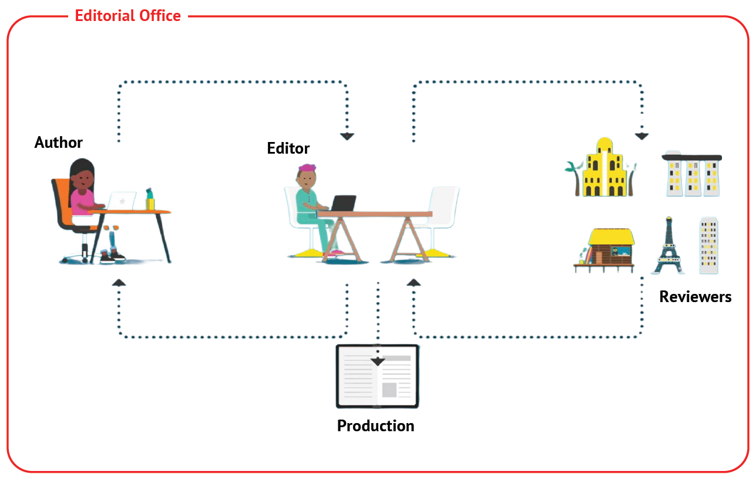
Peer review flowchart
The entire editorial procedure for a contribution - from submission to publication - is automatic and carried out electronically.
Authors, editors and reviewers run their specific stages of the editorial procedure through personal web pages. An integrated system of notifications, online alerts and reminders helps users keep track of the due actions.
The editorial office, the directors and all users involved in a manuscript can be contacted at any time by means of the "Write a message" button available in the "Actions" panel of the manuscript page. This must always be used for communications instead of normal e-mails (see also "Communications").
The following image shows the typical manuscript flowchart from submission to production. Publication takes place on a rolling basis thereafter.
Statuses and Actions
The following table shows the different stages in which a manuscript can be and the expected action.
| Status | What happened | Possible actions | Action expected of |
| Assigned to Editor | A new submission has come in and has been assigned to the editor-in-charge |
|
Editor-in-charge |
| In review | One or more reviewers have been selected (can include the editor themselves) and at least one report is still expected |
|
Reviewer / editor-in-charge (if the editor previously clicked "I will review") |
| Waiting for decision | All requested reports have come in |
|
Editor-in-charge |
| Major/minor revision requested | The editor-in-charge has requested the authors to revise their manuscript (either major or minor changes) |
|
Author |
| Resubmitted major/minor revision | The author has re-submitted their manuscript |
|
Editor-in-charge |
| Appeal open | The author would like to appeal against rejection and the process has been opened by the editorial office |
|
Author |
| Appeal submitted | The author has re-submitted their manuscript for reconsideration in JQuant |
|
Editor-in-charge |
| Rejected/Not Suitable | The editor-in-charge has issued a "Rejected" or a "Not suitable" decision. The manuscript is no longer unders consideration in JQuant. |
|
Author |
| Ready for typesetter | The Editor-in-charge has accepted the manuscript for publication |
|
Typesetter |
| Proofreading | The manuscript has been typeset and sent the author for proofreading OR the corrections/replies to queries sent by the author have been implemented and the manuscript has been sent back to them for a final check before publication |
|
Author |
| Ready for publication | The production stage is complete and the manuscript is ready to be published |
|
Editorial Office |
| Published | The manuscript has been published in JQuant |
|
Author |